The open video editor AI can drive.
OpenFrame is a free, open-source video editor built to feel like CapCut, with the depth of Premiere and VEGAS. It runs entirely on your computer, and any AI agent can edit alongside you through its MCP tools.
- License
- GPL-3.0-only
- Runs on
- Windows desktop, tested; a web build in Edge
- Installers
- None yet: you build it from source
0:00 Every video editor makes you choose. Easy. Powerful: the home screen and the full editor, side by side.
An AI agent cut, scored and narrated this film inside OpenFrame, through its MCP tools, in about 30 calls. The music came from the app's music generator and the voice from its text to speech, checked by its listen-back review. The only part made outside the editor is the footage of the app itself, recorded in a headless browser. A vertical 9:16 cut was laid out from a copy of the same project. How the film was made
Read the film as text
The narration in quotes, then what is on screen.
-
0:00
“Every video editor makes you choose.”“Easy... or powerful.” Every video editor makes you choose. Easy. Powerful: the home screen and the full editor, side by side.
-
0:08
“OpenFrame is both.” The OpenFrame logo and wordmark: the open video editor AI can drive.
-
0:12
“A magnetic timeline that keeps every edit in sync.” Cut. Magnetic timeline: the editor in a floating window, its timeline full of clips and titles.
-
0:16
“Real color wheels, curves and looks.” Color. Real color: the color wheels regrade a waterfall, close up.
-
0:20
“Keyframes and motion paths, for graphics that move.” Motion. Motion paths: keyframes and their value graph under the player.
-
0:24
“Captions, word by word, styled your way.” Words. Style every word: one word of the title BEYOND BLUE turns blue.
-
0:28
“A full mixer, and music written for your cut.” Sound. Mix it. Score it: the mixer's faders under an aerial shot.
-
0:32
“Split screens and picture-in-picture, in one click.” Layouts. One-click layouts: two aerial shots become a split screen.
-
0:36
“And there's one thing no other editor can do.” One thing no other editor can do.
-
0:40
“Any AI agent can edit with you, live, over MCP.” AI agents. Live, over MCP: an agent fills an empty project's timeline shot by shot and titles it OPEN WATER.
-
0:45
“Every change lands on your timeline. And every change can be undone.” Undo. Every change, undoable: the AI assistant titles a skyline NIGHT FALLS, and both changes undo in one step.
-
0:52
“This film was cut, scored, and narrated by an AI agent, inside OpenFrame.” Made with OpenFrame. Cut, scored and narrated by an AI agent: a timeline with music and voice tracks, then its export.
-
1:00
“OpenFrame. Free, open source, and yours to build.” OpenFrame. Free and open source. github.com/gAlexander77/openframe
Music: an original 120 BPM score in F minor, generated in OpenFrame for the film. It starts quietly under the first line, drops as the logo appears at 0:08, breaks down for “one thing no other editor can do,” drops again for the agent at 0:40, and lands its final hit on the end card at 1:00.
CapCut's four panels. A professional editor underneath.
If you have used CapCut, you already know where everything is. Under the familiar layout sit the tools of Premiere, Resolve and VEGAS: pro trims, real color grading, keyframe graphs and loudness to broadcast spec.
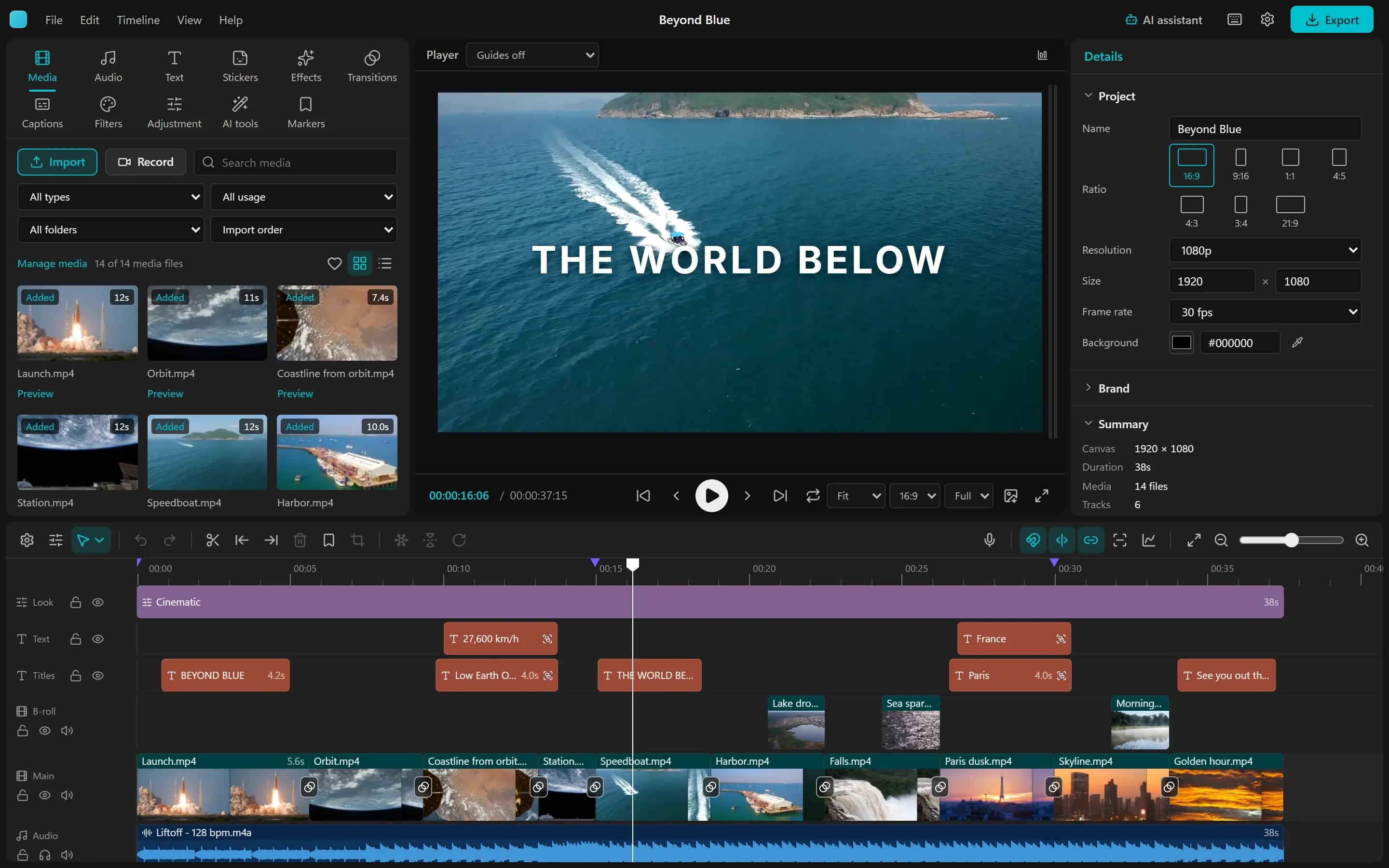
- Library Media, audio, text, stickers, effects, transitions, captions, filters and AI tools, previewed on your own footage.
- Player Frame-exact preview on the audio clock, with scopes, guides and a loudness meter.
- Inspector Every setting of the selected clip, and every number can be keyframed.
- Timeline A magnetic main track, snapping and linkage, as many tracks as the edit needs.
Cut fast. Trim to the frame.
CapCut's magnetic main track, snapping and linkage on top, Premiere's trim tools underneath.
- A magnetic main track, snapping and linkage keep the edit tight; titles and sound effects follow their shot.
- Ripple, roll, slip, slide and rate stretch, with a two-up preview of the frames on each side of the cut.
- Compound clips, groups, linked picture and sound for J and L cuts, lift and extract, close gaps.
A clip is split at the playhead on OpenFrame's timeline, and its new edge is dragged while a readout shows the duration.
Grade with real color tools.
Lift, gamma, gain and offset wheels, curves, HSL and LUTs, applied in Lumetri's order.
- Basic sliders, eight-range HSL, monotone curves and color wheels that agree with the vectorscope.
- 1D and 3D .cube LUTs with an intensity; 17 looks; adjustment layers grade everything below them.
- A luma waveform, RGB parade, vectorscope and histogram of the graded picture.
The Lift wheel is dragged toward teal and the Gamma wheel toward orange; the waterfall shot's shadows cool and its midtones warm.
Type that moves.
Titles animate by letter, word or line, and you type them straight onto the picture.
- Typewriter, letter rise, word pop, highlight and underline sweeps, with a stagger and an order for any animation.
- 12 animated templates and 16 word-art looks; glow, gradient fills and a second outline.
- Double-click a title in the viewer and type: the frame redraws in the real style as you go.
CITY LIGHTS is typed into a new title over a city at dusk, then plays in letter by letter with the Letter rise animation.
Captions, made on your computer.
Whisper transcribes on your machine: no upload, no limit, no subscription.
- Readable line breaks, or one word at a time for short-form video.
- The spoken word lights up; six caption looks restyle every caption in one click.
- Edit by transcript: select words, press Delete, and the cut is made with the pause around it.
Captions in the Word pop look play over aerial footage, each word turning green as it is spoken.
Effects that preview on your shot.
effects and 24 transitions, drawn by the same engine that exports them.
- Library cards preview each effect, filter and transition on the selected clip's own frame.
- Masks with feather and invert, 13 blend modes, chroma key and adjustment layers.
- Remove the background on your computer, then set a title behind the person.
The Glow effect is dropped on a skyline at dusk and the city lights bloom; its Amount and Threshold appear in the inspector.
Sound that is ready to publish.
A clean mix, measured the way platforms and broadcasters measure it.
- EQ, a compressor with Enhance voice, low- and high-pass filters, reverb, echo and tape stop, identical in preview and export.
- A live loudness meter in LUFS, and a report against online, EBU R128 or ATSC A/85 before you export.
- Normalize to -14, -16, -23 or -24 LUFS with a true-peak limiter.
On a music clip the Low-pass filter is on, Hall reverb is chosen and its mix raised, then playback runs with the level meter moving.
An AI agent can edit with you, live.
Turn on Allow AI agents in the desktop app, click Add to Claude Code or Add to Codex, and ask for the video you want. The agent imports your footage, cuts it to the music, adds titles and transitions, looks at its own frames and exports, while every edit lands on your timeline as it happens.
- 165 MCP tools cover the whole job, each with a schema, an example and a place in the order a video gets made.
- Playbooks for an ad, a music-synced epic edit and a vertical short teach a model the design rules editors use.
- You always know who acted: each change the agent makes is named at the top of the window, marked AI agent with the robot icon, and undoes like your own.
- Local and opt-in: the server is off until you turn it on, listens on 127.0.0.1 only and needs this install's token.
Prefer to type? The built-in AI assistant runs a model on your own computer through Ollama or LM Studio, with the same editing tools, and every answer undoes in one step.
An agent fills an empty project over MCP: footage lands on the timeline, then music, a COASTLINE title, transitions, a warm look and beat markers.
Built by AI agents, in the open.
OpenFrame is an experiment: can AI coding agents build a fully open, professional video editor? Since October 13, 2026, agents have written almost all of it, most of it Claude Opus 5.5 working in Claude Code, with Codex alongside. A human owner sets the direction, tries every build and decides what ships.
- 116 architecture decisions are written down with the reasons and the evidence, so each agent picks up where the last one stopped.
- The film and every clip on this site were made by agents too: the clips recorded from the running app, the film cut, scored and narrated in OpenFrame.
- Checked in the running product, not only in tests: agents drive the real app in a headless browser to try their changes.
Your footage stays on your computer.
There is no OpenFrame server and no account. Editing, export, captions, background removal and speech all run on your hardware.
-
Nothing is uploaded
Projects and media stay in the app's folder on your disk, or in your browser's private storage for the web build. The app has no analytics or telemetry.
-
Models run locally
Whisper for captions, Kokoro for speech and the background-removal models download once from Hugging Face the first time you use them, then work offline.
-
Agents stay local
The MCP server is off until you turn it on. It listens only on 127.0.0.1 and needs this install's token, so no website or other computer can reach it.
Build it from source.
There are no installers yet. With Node.js, Rust and Tauri's prerequisites installed, four commands run the desktop app.
Or try the web build in your browser: npm run dev, then open http://localhost:1420. It runs on your device
with what your browser supports; the desktop app is the main product.
git clone https://github.com/gAlexander77/openframe.git
cd openframe/openframe-applicationnpm ci
npm run tauri devEvery line is yours to read, change and share.
OpenFrame is free software under the GNU General Public License, version 3. Use it for anything, commercial work included; your videos stay yours. The code, the decisions behind it, the research and the history live in one public repository, written for the people and agents who work on it next.